
Match Similar Fields Automatically
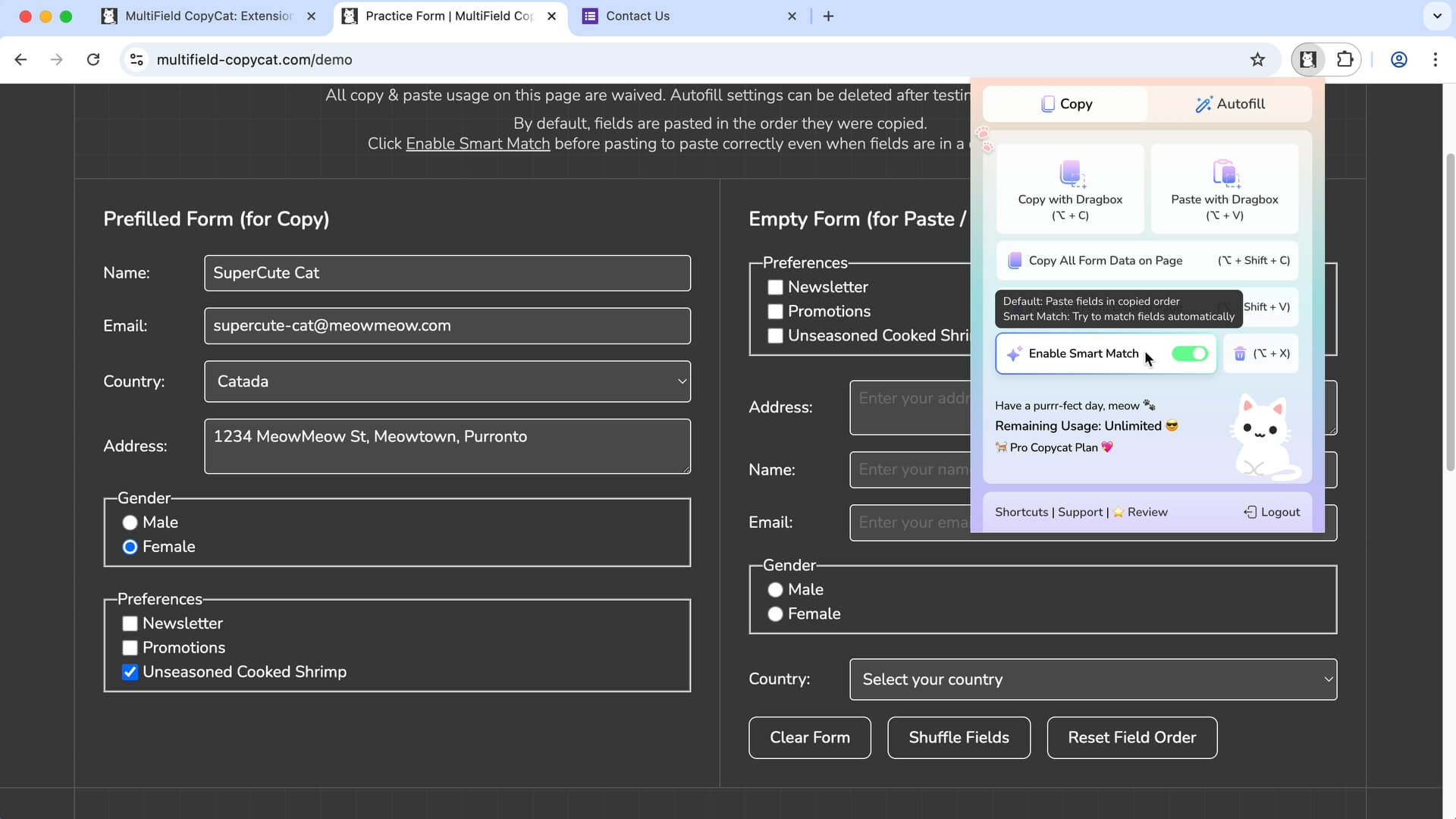
Smart Match compares field information to find similar fields, so it can fill form data into matching fields even when they are in different layouts or field orders.
 Features > Smart Match Form Data
Paste or autofill your form data across different forms, even when fields are in a different order. Smart Match automatically matches your data to similar fields, helping you fill forms faster with less manual correction.
🚀 Join 3000+ productive professionals
Used by professionals from




 Key Features


Smart Match compares field information to find similar fields, so it can fill form data into matching fields even when they are in different layouts or field orders.
Easily enable or disable smart match anytime from the extension and customize how matching works.
Reuse saved form data across sites more efficiently with cross-site pasting or autofill, when compatible fields can be matched.
Create custom Field Groups with your own matching terms to help Smart Match recognize fields specific to your workflow, improves field matching across different sites.
 Built for Web Forms


MultiField CopyCat works with standard form fields and popular custom form components, helping you copy, paste, and autofill form data across different websites.
Work with names, emails, addresses, phone numbers, and other text inputs.
Handle messages, notes, descriptions, and other longer text.
Save and restore selections from dropdown menus.
Save and restore selections from groups of options.
Save and restore individual or grouped selections.
Save and restore on/off selections on supported controls.
Compatibility may vary for highly customized or non-standard form controls.
 Less Typing, More LivingLess Typing, More LivingLess Typing, More LivingLess Typing, More LivingLess Typing, More LivingLess Typing, More Living
 Simple Pricing. No Surprises

Try MultiField CopyCat for free with essential features.
Upgrade to Pro to unlock unlimited form copy, paste, and autofill.
(All prices in USD)
FREE
Essential extension to save time and reduce frustration.
 Copy & paste all form data (selected area / full page)Sequential mode & Smart Match mode for pastingDragbox: select fields within visible area10 copy & paste actions per weekCustomizable keyboard shortcutsBasic form autofill features
Unlock full power to speed through forms effortlessly.
Includes everything in Basic, plus:Unlimited copy & paste actionsAuto-Scroll Dragbox: select fields beyond visible areaSmart Match custom field matching across websitesAdvanced form autofill featuresStandard SupportCancel anytime. No hidden fees
Less Typing, More LivingLess Typing, More LivingLess Typing, More LivingLess Typing, More LivingLess Typing, More LivingLess Typing, More Living Q&A
Q&A
Can’t find what you are looking for? Please contact us.
Smart Match matches copied or saved data to similar form fields using labels and other field information. Unlike Sequential mode, it doesn't rely only on field order, making it useful when forms have different layouts.
Yes. Smart Match uses field similarity rather than position alone, so it can match fields even when the destination form uses a different order.
Yes. You can use Smart Match for cross-site pasting or autofill when the forms contain compatible fields, even if their labels or layouts are not identical.
Smart Match compares field information, such as field labels, field attributes, and known matching terms in custom field groups, to identify fields with similar meaning, for example, “Email” and “Email Address.” Because forms can be built in many different ways, always review the filled result before submitting.
Yes. Pro plan includes Custom Field Groups, which let you define terms that your workflow treats as equivalent. For example, you could group “Job Title”, “Position” and “Role” together so Smart Match recognizes them as the same type of information and allow them to match across different forms.
If Smart Match can't find a suitable match, the value may be skipped and the destination field left unchanged. You can fill any missing fields manually, or create Custom Field Groups if you regularly encounter field labels that Smart Match doesn't recognize.
Smart Match works best when forms provide clear labels or other recognizable field information. Results may vary with highly customized or ambiguous form controls, so we recommend reviewing the filled result before submitting.
Yes — all your copied and autofill data is stored locally in your browser and never leaves your computer. For your privacy, we recommend not saving sensitive information, especially if you share your device or it’s ever lost.


