
Multi-Copy. Multi-Paste. All At Once.
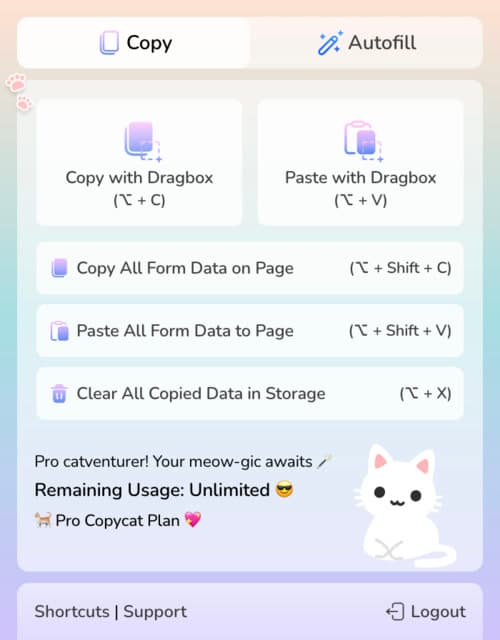
Forget field-by-field chaos. Just hit a button, drag a box to copy your target fields, and paste your form data in seconds — even across tabs.
 Featured on Chrome Web Store

MultiField CopyCat is a chrome extension to copy, paste, and autofill multiple form fields or all web form data on page with one click or shortcut.
Fill forms 10x faster, save clicks and hours every week,
so you can have more time to do more or enjoy life.
🚀 Join 3000+ productive professionals





Try it free. Upgrade for full power at anytime
Used by professionals from



 Less Typing, More LivingLess Typing, More LivingLess Typing, More LivingLess Typing, More LivingLess Typing, More LivingLess Typing, More Living
 Do More in Less Time


Tired of filling out the same info again and again?
Use MultField CopyCat - quick form fills, fewer clicks, less typing.
Forget field-by-field chaos. Just hit a button, drag a box to copy your target fields, and paste your form data in seconds — even across tabs.
Copy all form field data on a page with a single click. Paste them exactly where you need it — perfect for long forms, data migration, or repeated submissions.
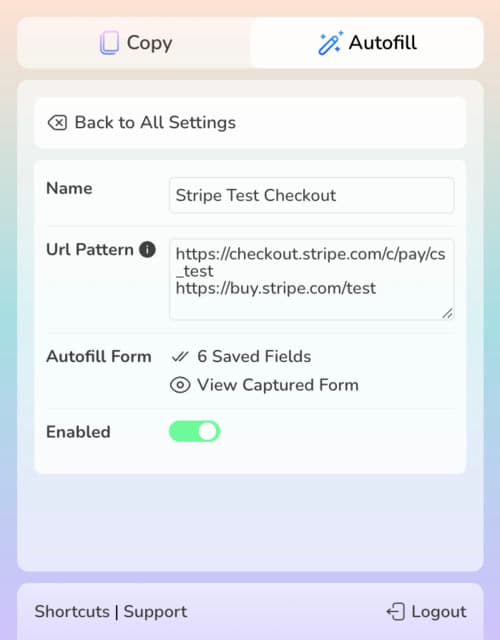
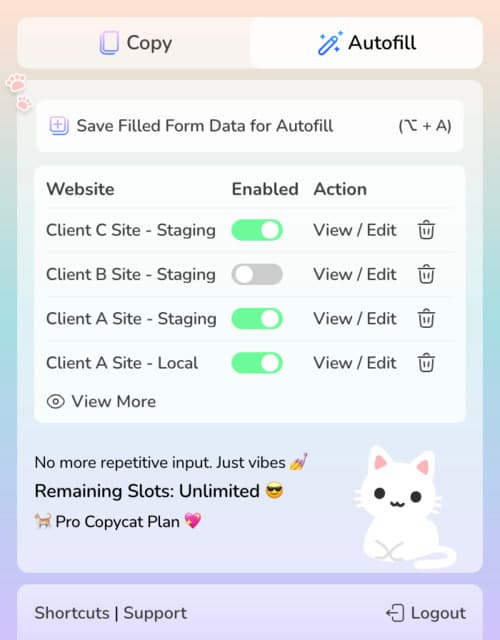
Fill out a form once and hit save. Next time you visit, MultiField CopyCat autofills your saved entries — instantly.
Power users, rejoice. Copy, paste and save autofill form data using customizable shortcuts — for lightning-fast workflow.
 Simplify Everyday Tasks


Whether you're managing forms all day, or just tired of typing the same info repeatedly — MultiField CopyCat fits right into your daily workflow.
Tired of entering the same contact, registration details or information again and again? Save it once — paste or autofill in seconds.
Add products, listings, or migrate content across pages in CMS with fewer clicks. Keep your workflow fast and wrist-friendly.
Copy field data from one staging environment and paste it into another. Autofill form entries in test environment or bug reporting form. Ideal for devs, testers, and anyone juggling environments.
Stop typing the same job info on different platforms. Fill out once, then reuse it everywhere with MultiField CopyCat's bulk copy & form autofill functionality.



 Less Typing, More LivingLess Typing, More LivingLess Typing, More LivingLess Typing, More LivingLess Typing, More LivingLess Typing, More Living
 Simple Pricing. No Surprises


Try MultiField CopyCat for free with essential features.
Upgrade to Pro to unlock unlimited form copy, paste, and autofill.
(All prices in USD)
FREE
Essential extension to save time and reduce frustration.
 Copy & paste all form data (selected area / full page)Sequential mode & Smart Match mode for pastingDragbox: select fields within visible area10 copy & paste actions per weekUnlimited autofill with up to 3 saved settingsSave 1 form set per autofill settingEdit or delete saved autofill settingsCustomizable keyboard shortcuts
Unlock full power to speed through forms effortlessly.
Includes everything in Basic, plus:Unlimited copy & paste actionsUnlimited autofill without restrictionsAuto-Scroll Dragbox: select fields beyond visible areaSmart Match custom field matching across websitesSave multiple form sets per autofill settingSwitch between, edit, or delete multiple autofill form setsCustom autofill delay for slow-loading sitesStandard SupportCancel anytime. No hidden fees
That’s extra time for everything else in life that matters.
 Q&A
Q&A
Can’t find what you are looking for? Please contact us.
Yes! No credit card or signup needed. You can use all core features like copy & paste form data and autofill — with some limits. It’s perfect for causal use or testing before going Pro.
These are two paste modes that control how your copied form fields are applied to a destination form. Sequential Mode pastes fields in the exact order you copied them, which is ideal when the source and destination forms have the same layout.
Smart Match Mode attempts to automatically match fields based on their similarity, even when the field order or layout differs. This helps move data across forms with different field order or slightly different labels. You can toggle between these modes in the extension popup.
Pro plan unlocks all advanced features: unlimited form copy & paste actions, unlimited form autofill, multiple form set per autofill setting, Smart Match custom field groups, and Auto-Scroll Dragbox for field selection — all for $59/year with Priority Support, or $5.99/month with Standard Support. Work faster, save time, and handle forms like a pro.
We also provide downloadable receipts for easy reimbursement or accounting.
If you cancel your subscription, you’ll keep full access of all pro plan's features until the end of your subscription period. There are no hidden fees, and your subscription won’t renew automatically.
MultiField CopyCat works on most websites that use standard form fields. Some special input types, such as file uploads, fields with IDs that change on page load, or heavily customized elements may not be supported. We recommend trying the free version before upgrading to Pro — or share your case with us! Your feedback helps us improve coverage and prioritize new features.
Yes — all your copied and autofill data is stored locally in your browser and never leaves your computer. For your privacy, we recommend not saving sensitive information, especially if you share your device or it’s ever lost.
Currently, settings are saved locally in your browser and won’t carry over between devices or profiles. Export/Import features may be added in future based on user feedback.


