
Copy Form Data in One Click
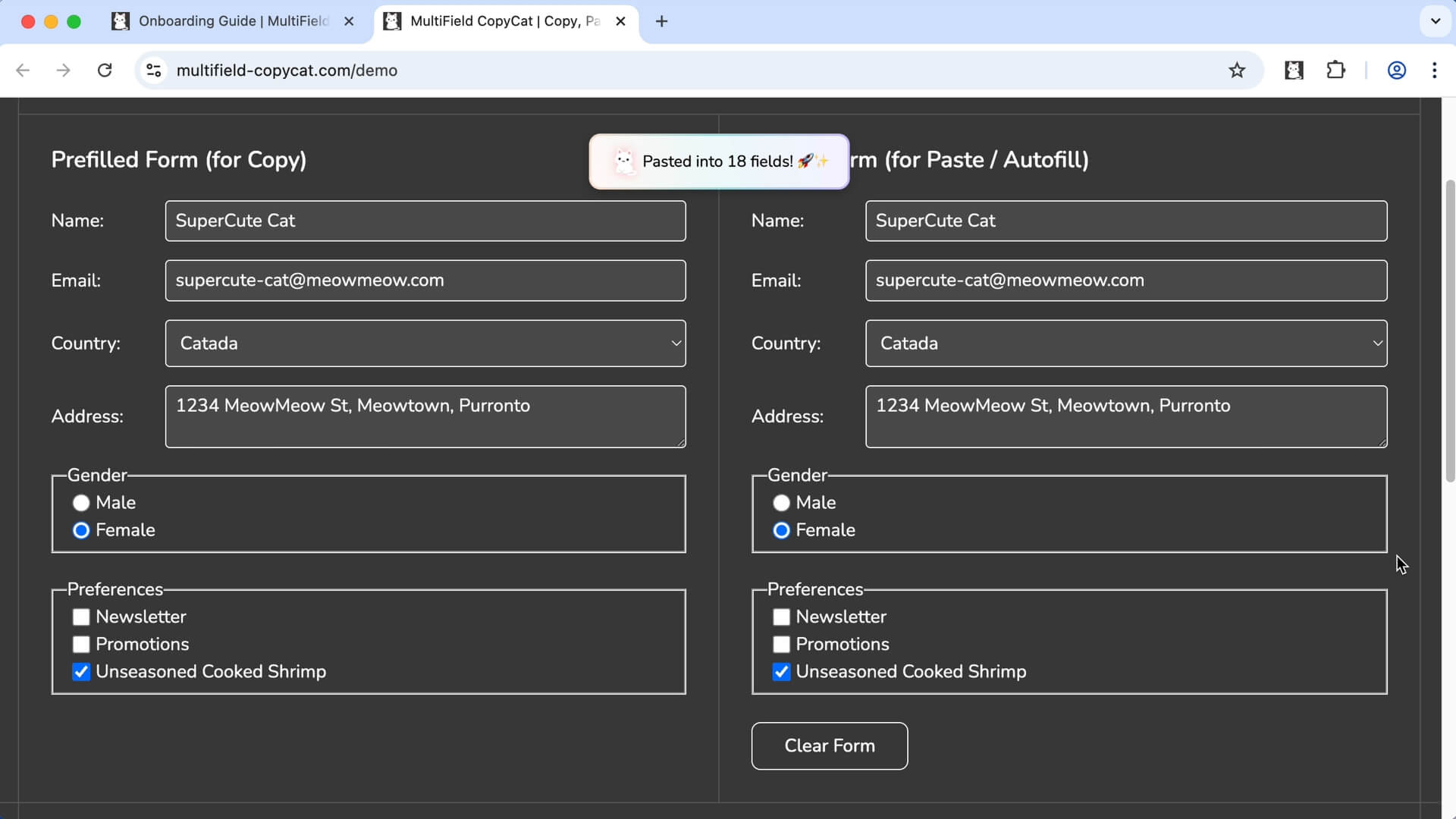
Instead of moving each value individually, copy all form fields across the page at once and paste them all in one click or shortcut. Perfect for data migration or repeated submissions.
 Features > Copy All Form Content
Copy all form data on a page in one click or shortcut, then paste it into another form when you need it. MultiField CopyCat helps you move complete form data faster without copying each field individually.
🚀 Join 3000+ productive professionals
Used by professionals from




Key Features


Instead of moving each value individually, copy all form fields across the page at once and paste them all in one click or shortcut. Perfect for data migration or repeated submissions.
Use default Sequential mode to paste form data in the exact order as copied, or Smart Match mode to paste data into matching fields based on their similarity automatically.
Use built-in keyboard shortcuts, or customize your own to copy and paste form data even faster.
 Built for Web Forms


MultiField CopyCat works with standard form fields and popular custom form components, helping you copy, paste, and autofill form data across different websites.
Work with names, emails, addresses, phone numbers, and other text inputs.
Handle messages, notes, descriptions, and other longer text.
Save and restore selections from dropdown menus.
Save and restore selections from groups of options.
Save and restore individual or grouped selections.
Save and restore on/off selections on supported controls.
Compatibility may vary for highly customized or non-standard form controls.
 Less Typing, More LivingLess Typing, More LivingLess Typing, More LivingLess Typing, More LivingLess Typing, More LivingLess Typing, More Living
 Simple Pricing. No Surprises

Try MultiField CopyCat for free with essential features.
Upgrade to Pro to unlock unlimited form copy, paste, and autofill.
(All prices in USD)
FREE
Essential extension to save time and reduce frustration.
 Copy & paste all form data (selected area / full page)Sequential mode & Smart Match mode for pastingDragbox: select fields within visible area10 copy & paste actions per weekCustomizable keyboard shortcutsBasic form autofill features
Unlock full power to speed through forms effortlessly.
Includes everything in Basic, plus:Unlimited copy & paste actionsAuto-Scroll Dragbox: select fields beyond visible areaSmart Match custom field matching across websitesAdvanced form autofill featuresStandard SupportCancel anytime. No hidden fees
Less Typing, More LivingLess Typing, More LivingLess Typing, More LivingLess Typing, More LivingLess Typing, More LivingLess Typing, More Living Q&A
Q&A
Can’t find what you are looking for? Please contact us.
Click Copy All Form Data on Page under the Copy tab, or use its keyboard shortcut. MultiField CopyCat copies all the recognized form values on the page together, ready to paste in one action.
MultiField CopyCat supports standard text fields and text areas, dropdowns, checkboxes, radio buttons, switches, and many modern form controls. File uploads and some highly customized inputs may not be supported.
Yes. After copying, open another page or tab and choose Paste All Form Data to Page, or use its shortcut. Sequential mode pastes form values in their copied order, while Smart Match can help match copied values to similar fields when the form layout or field order differs.
Yes. Turn on Smart Match mode before pasting and it will try to pair copied values with similar destination fields instead of relying only on the copied field order.
MultiField CopyCat works on most websites that use standard form fields. Some special input types, such as file uploads, fields with IDs that change on page load, or heavily customized elements may not be supported. We recommend trying the free version before upgrading to Pro — or share your case with us! Your feedback helps us improve coverage and prioritize new features.
Yes — all your copied and autofill data is stored locally in your browser and never leaves your computer. For your privacy, we recommend not saving sensitive information, especially if you share your device or it’s ever lost.


